


TD Snap Express
Last updated: 21/08/2026
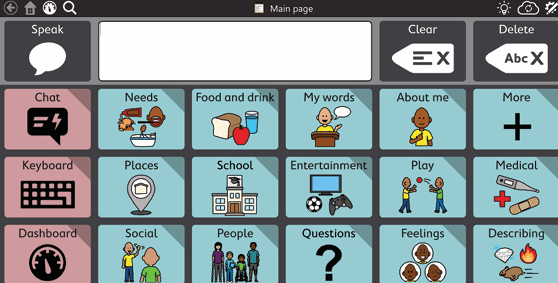
TD Snap Express is an intuitive page set designed for simplicity and ease of use. It supports growth in communication and language skills by using phrases and words to build messages. With decreased navigation demands and easy-to-find vocabulary, any caregiver or communicator can get up and running quickly using theme-based pages to communicate.
General
Languages
Arabic, Chinese (Simplified), Danish, Dutch, Dutch BE, Dutch NL, English/Australian, French, French (Canadian), German, Italian, Japanese, Japanese (Hiragana), Japanese (Kanji), Norwegian, Polish, Portuguese, Portuguese (Brazil), Slovenian, Spanish, Spanish (Mexican), Swedish, US English, US Spanish
Does this vocabulary cost to access?
Vocabulary included in software price, Subscription cost
Format
Electronic
Translation Method
Linguists to support morphology and SLTs where available
Supplier
Tobii Dynavox
Software Required
Windows or iOs
Text To Speech
Are voices available in the same language(s) as the vocabulary?
Yes
What voices are available?
Male adult, Female adult, Male child, Female child
Does the system need internet access for the voice to run?
No
Vocabulary
Is the settings/software menu available in the same language(s) as the vocabulary?
Yes
Does the package support code switching (speaking two or more languages within one sentence/message bar)?
No
Can the user switch between languages while staying in the vocabulary package? (E.g via a link on the home page or tool bar etc)
Yes
When the vocabulary was created what features of the language were considered?
Category organisation of vocabulary Reflect common communication patterns Single words Phrases Sentence starters Allow for personalisation and customisation
Is it a Text-only or Symbol + Text vocabulary?
Symbol + Text
Symbol + Text
Are there written labels on the cells as well as symbols?
Yes
Is it possible to have two labels on the cell with the symbol?
No
Is it possible to have symbol-only page sets? (i.e no written labels)
Yes
Is there a keyboard available?
Yes
What keyboards are available?
Keyboards in both the language(s) of the vocabulary and English (e.g. an Urdu vocabulary has both an Urdu keyboard and an English keyboard)
Is there a search function/word finder?
Yes
Can you change the skin tone of symbols?
Yes
Can the vocabulary content be personalised for the individual?
Yes
What level of language ability does this package support? (pick the best fit category)
One word or prestored message at a time (this could include a prestored message that says “I need a drink” but would not offer the flexibility to change the message to “I need juice”) Combining sentence starters with endings (this could be e.g. a Food page that has some sentence starters, “I want to eat…” “I don’t like…” and a word bank to complete the sentence)
What topics of conversation does the system support? (choose the best fit category)
Wide range of topics including school topics (children) work/ daily living related vocabulary (adults) and common hobbies/ interests, cultural/ religious practices
Is there a translation function available?
No
Related Resources
View All >Resources available in Arabic, Chinese (Simplified), Danish, Dutch, Dutch BE, Dutch NL, English/Australian, French, French (Canadian), German, Italian, Japanese, Japanese (Hiragana), Japanese (Kanji), Norwegian, Polish, Portuguese, Portuguese (Brazil), Slovenian, Spanish, Spanish (Mexican), Swedish, US English, and US Spanish


FAQs
Answering common queries and concerns.