



Avaz
Last updated: 15/05/2026
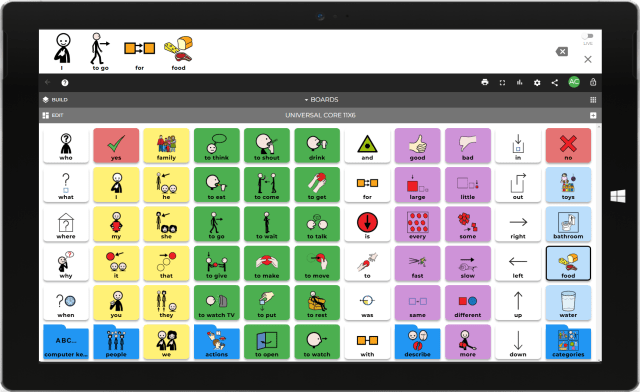
Avaz AAC has a robust picture & text-based vocabulary graded in three levels: beginner, intermediate, and advanced. Words are arranged in a core and fringe layout, with Fitzgerald colour coding. Words are laid out in a consistent pattern ensuring quick access and motor memory growing with the communicator. Quickly toggle between picture and keyboard mode to create sentences using written words or symbols. Avaz features an 'expressive tone' setting that reflects different emotions of the user (available in US voices only at present). Please note this entry has been created by Language Library Moderators using the best available information.
How to access the resource:
Avaz can be downloaded on Apple App Store or Google Play
General
Languages
Bengali, Danish, Faroese, French, Hungarian, Sinhala, Swedish, Tamil, Vietnamese, English
Does this vocabulary cost to access?
Vocabulary included in software price
Format
Electronic
Translation Method
‘Fluent’ speaker of the language e.g. a Polish vocabulary that has been created by a fluent Polish speaker who is not trained in e.g. AAC or Linguistics would meet this criteria
Supplier
Avaz.inc
Software Required
ios or Android
Text To Speech
Are voices available in the same language(s) as the vocabulary?
Yes
What voices are available?
Male adult, Female adult, Male child, Female child
Does the system need internet access for the voice to run?
No
Vocabulary
Is the settings/software menu available in the same language(s) as the vocabulary?
The settings menu in the software will match the language that has been set on the main operating system (Android/iOS)
Does the package support code switching (speaking two or more languages within one sentence/message bar)?
Yes
Can the user switch between languages while staying in the vocabulary package? (E.g via a link on the home page or tool bar etc)
Yes
When the vocabulary was created what features of the language were considered?
There are differences between the words included in different languages, appropriate symbols and cultural phrases.
Is it a Text-only or Symbol + Text vocabulary?
Symbol + Text
Symbol + Text
Are there written labels on the cells as well as symbols?
Yes
Is it possible to have two labels on the cell with the symbol?
No
Is it possible to have symbol-only page sets? (i.e no written labels)
No
Is there a keyboard available?
Yes
What keyboards are available?
Just English keyboard
Is there a search function/word finder?
Yes
Can you change the skin tone of symbols?
Yes
Can the vocabulary content be personalised for the individual?
Yes
What level of language ability does this package support? (pick the best fit category)
Combining several words together to make sentences, but not necessarily grammatically correct. Combining several words together at sentence level and including the correct grammar, such as using the correct verb form, and noun-verb agreement and other features as expected in the language. (to meet this criteria the functioning of the vocabulary must be able to accommodate the language’s sentence structure and grammar).
What topics of conversation does the system support? (choose the best fit category)
Wide range of topics including school topics (children) work/ daily living related vocabulary (adults) and common hobbies/ interests, cultural/ religious practices
Is there a translation function available?
No
Related Resources
View All >Resources available in Bengali, Danish, Faroese, French, Hungarian, Sinhala, Swedish, Tamil, Vietnamese, and English




FAQs
Answering common queries and concerns.